
For most Alberta businesses, Shopify wins on speed, security, and out-of-box conversion tools, while WordPress (with WooCommerce) wins on content control, SEO flexibility, and long-term cost ownership. If your product costs are exposed to tariffs and you need to update pricing and messaging fast, WordPress gives you more control. If you want a store to live in days with less maintenance, Shopify wins.
What Are WordPress and Shopify, Exactly?
WordPress is a free, open-source content management system (CMS). On its own, it doesn’t sell products; you add the WooCommerce plugin to turn it into a store. You own the code, the hosting, and the data.
Shopify is a fully hosted e-commerce platform built only for selling. Hosting, security, checkout, and PCI compliance are handled for you. You rent the platform through a monthly subscription instead of owning the infrastructure.
Key terms you’ll see in this guide:
- WooCommerce : the free plugin that adds shopping cart and checkout functionality to WordPress.
- CMS (Content Management System): software used to create and manage website content without writing code from scratch.
- Headless commerce: separating the front-end design from the back-end store engine, often used for advanced custom builds.
- De minimis threshold : the dollar value under which imported goods cross a border without duty. Recent U.S. changes to this threshold directly affect Canadian sellers shipping south.
- CUSMA (Canada-United States-Mexico Agreement): the trade deal that determines whether Alberta-made goods qualify for reduced or exempt tariffs when sold into the U.S.
Both platforms can build a professional, fast, mobile-friendly store. The real difference is who controls what, and how fast you can react when costs change.
Why This Decision Matters More for Alberta Businesses Right Now
Alberta business owners are not choosing a platform in a vacuum. Trade conditions between Canada and the U.S. have shifted repeatedly through 2025 and 2026, with tariff rates, exemptions, and refund rules changing on short notice. Businesses that source materials from the U.S., ship products south, or compete against U.S.-based online retailers are feeling this directly through higher landed costs, tighter margins, and pricing that needs to change faster than it used to.
This matters for your platform choice for three practical reasons:
- Pricing agility. If your cost of goods shifts because of a tariff change, you need to update prices, product descriptions, and shipping rules quickly across every product, not one at a time.
- Content-driven trust. When customers are more price-sensitive, they research before they buy. A platform that supports strong blog and educational content (like buying guides, “why prices changed” explainers, or local sourcing stories) can protect conversion rates during uncertain periods.
- Buy Local / Buy Canadian momentum. Alberta consumers are increasingly checking where a product is made before checkout. Your site needs to communicate that clearly and quickly, which is a content and design job, not just a checkout job.
Neither platform “solves” tariffs. But WordPress’s content flexibility makes it easier to explain pricing changes and build trust content fast, while Shopify’s speed-to-launch matters if you need to get selling and start generating revenue sooner rather than later.
Step-by-Step: How to Choose the Right Platform for Your Alberta Store
Summary: Work through these six questions in order. Most businesses can make the right call after step 4.
1. How many products will you sell, and how often does your catalogue change?
Under 100 SKUs with infrequent changes → either platform works. 500+ SKUs with frequent price or supplier changes → lean WordPress/WooCommerce for bulk-editing flexibility, or Shopify with a strong inventory app.
2. Do you already publish content (blog, guides, local news) as part of your marketing?
If content marketing is central to how you attract customers, WordPress’s publishing tools are stronger. Shopify’s blog exists but is a secondary feature.
3. Who will maintain the site after launch?
No in-house technical staff and no plan to hire one → Shopify’s managed model removes a maintenance burden. In-house developer or an ongoing agency relationship → WordPress ownership pays off over time.
4. What’s your realistic first-year budget?
Compare total cost, not sticker price (see the cost table below). Shopify has a predictable monthly fee. WordPress has lower software cost but variable hosting, plugin, and maintenance costs.
5. Do you sell cross-border into the U.S., or rely on U.S.-sourced inventory?
If yes, you need a platform (or app layer) that can handle changing duty calculations and fast price updates. Both platforms support this through apps, but WooCommerce gives more direct control over how that logic is coded.
6. How fast do you need to launch?
Shopify stores can typically accept payments within a day or two of setup. A properly built WordPress/WooCommerce store realistically takes several weeks. If you’re racing a seasonal deadline, that gap matters.

Common Mistakes Alberta Business Owners Make
- Choosing based on sticker price alone. WooCommerce looks “free,” but hosting, security plugins, premium themes, and developer time add up often landing close to what a mid-tier Shopify plan costs annually.
- Ignoring page speed. A slow store loses sales regardless of platform. Both WordPress and Shopify can be fast or slow depending on how they’re built and maintained.
- Skipping local SEO setup. Many Alberta stores launch without proper Google Business Profile integration, local schema markup, or Grande Prairie–specific landing pages, leaving easy local search traffic on the table.
- Not planning for tariff-driven price changes. Some stores hardcode prices into product descriptions or marketing copy, making updates slow and error-prone when costs shift.
- Underestimating checkout customization limits on Shopify’s standard plans. Businesses that need a heavily customized checkout often don’t realize this requires Shopify Plus, a significantly higher-cost tier.
- Overbuilding on WordPress. Adding too many plugins “just in case” creates security risk and slows the site — more isn’t better.
Best Practices for Converting Alberta Customers
- Show Canadian pricing and shipping clearly, with no surprise duties at checkout cart abandonment spikes when customers hit unexpected costs at the final step.
- Build trust signals above the fold: local business registration, physical location (even if online-only), and clear return policies.
- Optimize for mobile first. Mobile traffic and mobile purchases both represent the majority of e-commerce activity industry-wide, and Alberta shoppers are no exception.
- Use local landing pages (e.g., “Web Design & Online Store Setup in Grande Prairie”) to capture geographically specific search intent, not just generic product pages.
- Keep your platform lean. Fewer, better-chosen apps or plugins outperform a bloated stack on both speed and reliability.
- Publish buying guides and comparison content, not just product listings — this is where WordPress content tools have a real edge for education-led selling.
Expert Tips
- Run a checkout speed test on mobile before launching a 2-3 second delay at checkout is enough to lose price-sensitive shoppers.
- If you’re WooCommerce-based, use a managed WordPress host built for e-commerce rather than shared hosting; performance complaints almost always trace back to hosting.
- If you’re Shopify-based, audit your app list every quarter unused apps still add load time even when “disabled.”
- Build one dedicated FAQ or trust page addressing “why did prices change” if you’re in a tariff-exposed category (imported goods, U.S.-sourced materials). Transparency reduces support tickets and protects conversion.
- Track conversion rate by traffic source, not just overall. A platform migration or redesign can help one channel and quietly hurt another if you’re not watching both.
Real-World Scenarios (Illustrative Examples)
These are illustrative business profiles based on common Alberta e-commerce patterns, not case studies of specific named companies.
Scenario 1: Local outdoor gear retailer, Grande Prairie Sells 150 products, half sourced from U.S. suppliers exposed to tariff changes. Needs fast price updates and strong local SEO to compete with national chains. Better fit: WordPress/WooCommerce, for direct control over pricing logic and local content.
Scenario 2 : Handmade goods brand, direct-to-consumer Sells 40 products, all Alberta-made, wants to launch in under two weeks for holiday season, no in-house developer. Better fit: Shopify, for speed and managed infrastructure.
Scenario 3 : B2B industrial supplier, Peace Region Sells to other businesses with custom quoting, bulk pricing tiers, and a content-heavy resource centre for buyers. Better fit: WordPress/WooCommerce or Shopify Plus with B2B features the decision comes down to budget, since Shopify’s B2B tools are strong but sit behind a higher-cost tier.
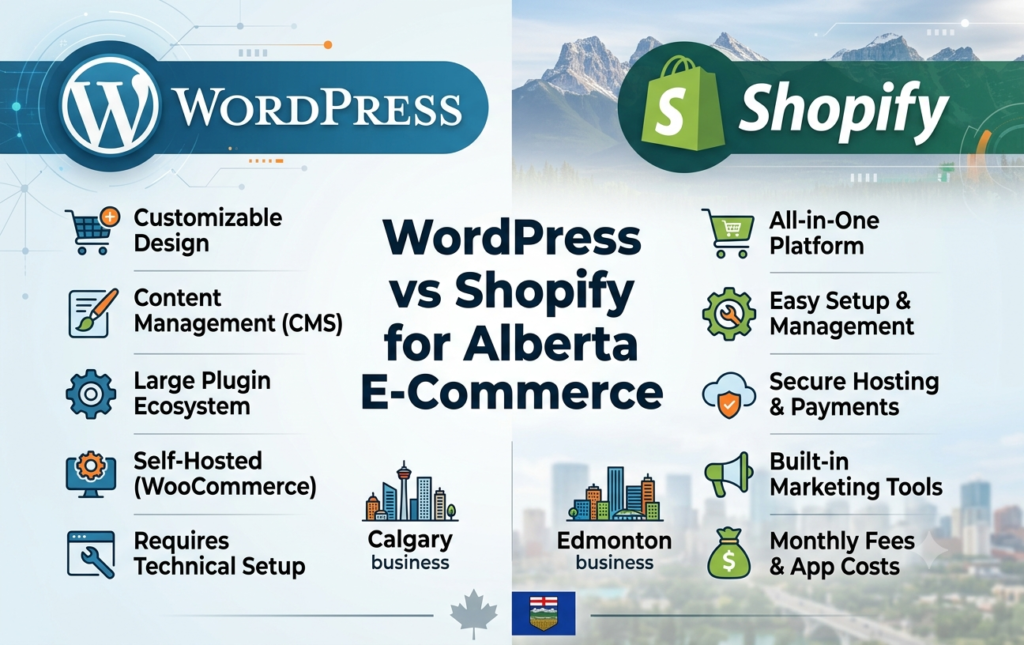
WordPress vs Shopify: Full Comparison Table
| Factor | WordPress + WooCommerce | Shopify |
|---|---|---|
| Setup time | 2–4 weeks typical for a proper build | 1–5 days for basic setup |
| Ownership | You own code, data, and hosting | Platform-hosted, you don't own the underlying code |
| Upfront software cost | Free (plugin costs extra) | Plans start around $39 USD/month |
| Realistic Year 1 cost (small store) | Roughly $1,200–$1,600 CAD equivalent including hosting, plugins, security | Roughly $89–$549 USD/month depending on sales volume, apps, and transaction fees |
| Content/blog tools | Strong — built as a publishing platform first | Functional but secondary to commerce |
| Checkout customization | Full control via code | Limited on standard plans; full control requires Shopify Plus (~$2,300+/month) |
| Maintenance responsibility | You or your developer/agency | Shopify handles hosting, security, PCI compliance |
| Scalability | Scales with proper hosting and optimization | Built to absorb high traffic without manual intervention |
| Best for | Content-led selling, custom logic, cost-sensitive long-term builds | Fast launch, low technical overhead, predictable monthly cost |
| SEO control | Deep, granular control over technical SEO | Good, but some technical SEO elements are platform-restricted |
Cost figures are directional based on 2026 industry cost breakdowns and will vary by store size, hosting provider, and app/plugin choices. Get a scoped quote for your specific catalogue size before budgeting.
Pros and Cons
WordPress + WooCommerce
Pros:
- Full ownership of code, content, and data
- Strongest platform for content-led, SEO-driven marketing
- No forced monthly platform fee costs are more controllable long-term
- Deep customization with no architectural ceiling
Cons:
- Longer setup time
- You (or your agency) are responsible for updates, security, and backups
- Performance depends heavily on hosting quality and plugin discipline
- Steeper learning curve for non-technical owners
Shopify
Pros:
- Fast setup sell within days
- Hosting, security, and PCI compliance handled for you
- Large app ecosystem for adding features without custom code
- Predictable monthly costs at the entry tier
Cons:
- Ongoing subscription cost regardless of sales volume
- Checkout customization is limited without Shopify Plus
- Content marketing tools are weaker than a purpose-built CMS
- You’re building on rented infrastructure, not owned code
Industry Insights: What's Actually Changing for Alberta Sellers in 2026
Trade rules between Canada and the U.S. have shifted more than once in the past year tariff rates on specific categories like steel, aluminum, and certain non-CUSMA-compliant goods have moved, and the U.S. has tightened low-value import exemptions that previously let smaller cross-border shipments through with minimal friction. For Alberta e-commerce sellers, the practical takeaway isn’t which exact rate applies today that changes it’s that your platform needs to make price and policy updates fast and store-wide, not product-by-product.
Alberta-specific trend data also points to a stronger “Buy Canadian” sentiment among consumers, which rewards stores that clearly communicate local sourcing, local ownership, and Canadian-made products. This is a content and messaging advantage as much as a technical one another reason the platform decision isn’t just about checkout mechanics.

Myth vs Fact
| Myth | Fact |
|---|---|
| "WordPress is always cheaper." | WordPress has lower forced platform fees, but total first-year cost (hosting, plugins, maintenance) often lands close to a mid-tier Shopify plan. |
| "Shopify can't be customized." | Shopify is highly customizable through apps and theme code — the real limit is checkout customization on standard plans. |
| "WordPress is insecure." | Core WordPress software has a strong security record; most vulnerabilities come from outdated plugins and themes, not the core platform. |
| "Shopify is only for small stores." | Major global brands run on Shopify, including large, high-traffic operations — it scales well beyond small business use. |
| "You need to be technical to use WordPress." | Day-to-day content and product management is accessible to non-technical users once the site is properly built and set up. |
| "Platform choice alone determines conversion rate." | Design quality, page speed, trust signals, and pricing clarity affect conversion more than which platform you're on. |
Troubleshooting Common Issues
- The store is slow after launch (either platform). Check image sizes first — unoptimized product images are the most common cause. On WooCommerce, also check for plugin conflicts and hosting quality. On Shopify, audit installed apps for unnecessary scripts.
- High cart abandonment at checkout. Usually caused by unexpected shipping or duty costs appearing late in checkout. Show total estimated cost, including any cross-border fees, earlier in the buying process.
- Product prices need to change quickly across many items (tariff-driven). On WooCommerce, use bulk-edit tools or a pricing plugin rather than updating products one by one. On Shopify, use a bulk editor or a pricing automation app tied to your cost data.
- Site ranks well but isn’t converting local Grande Prairie traffic. Check for a dedicated local landing page, local schema markup, and a properly filled-out Google Business Profile generic national pages rarely convert as well as location-specific ones.
- Migration between platforms broke SEO rankings. This almost always traces back to missing 301 redirects from old URLs to new ones. Map every old URL before migrating, not after.
Pre-Launch Checklist
- [ ] Chosen platform matches your technical resources and content strategy
- [ ] Mobile page speed tested and under 3 seconds
- [ ] Checkout shows full cost (including shipping/duties) before final step
- [ ] SSL certificate active and domain properly configured
- [ ] Local landing page created for your city/region
- [ ] Google Business Profile linked and verified
- [ ] Pricing update process documented (who updates what, how fast)
- [ ] Return and shipping policies clearly visible
- [ ] Analytics and conversion tracking installed before launch, not after
- [ ] Backup and security plan in place (hosting-level for WordPress, built-in for Shopify)
Key Takeaways
- Shopify wins on speed, managed security, and predictable monthly cost.
- WordPress/WooCommerce wins on ownership, SEO depth, and content-led marketing.
- Alberta’s tariff environment makes pricing agility and transparent, trust-building content more important than in less trade-exposed markets.
- Total first-year cost is often closer between the two platforms than the “free vs paid” framing suggests.
- The right choice depends on your catalogue size, in-house technical resources, and how central content marketing is to your growth strategy not on which platform is more popular.
Conclusion
There’s no universal winner between WordPress and Shopify the right platform depends on how your Alberta business actually operates. If you need to launch fast with minimal technical overhead, Shopify’s managed model removes friction. If content, SEO control, and long-term platform ownership matter more, especially while pricing stays sensitive to tariff shifts, WordPress with WooCommerce gives you more room to adapt.
If you’re weighing this decision for your own business and want a second opinion based on your specific catalogue, budget, and growth plans, CodeKraft builds both WordPress and Shopify stores for Alberta businesses and can help you figure out which one actually fits — no pressure either way.
Ready to Elevate Your Brand?
Let’s work together to create a marketing strategy that delivers results. Contact us today to get started